
Records, privacy and banned lists
What a bar sees when it scans your ID, and what it can keep
Published October 23, 2026 · 8 sources linked
What does a bar see when it scans your ID, and what can it keep?
The barcode on a US license holds the details printed on the card, such as the name, date of birth, address and ID number. A scanner can read all of it, but what staff see and what the venue keeps depend on the scanner, its settings and the state. Texas, Rhode Island and Hawaii do not allow information from an age-check scan to be kept, while New York, Nebraska and Utah set what may be kept or for how long.
ID scan data at a glance
- What the barcode holds
- The details printed on the card: name, date of birth, address, ID number, dates, sex, height and eye color
- Is the barcode encrypted?
- No. The national standard requires its data to be unencrypted
- States that bar keeping age-check scan data
- Including Texas, Rhode Island and Hawaii
- States that set what is kept or for how long
- Including New York, Nebraska and Utah
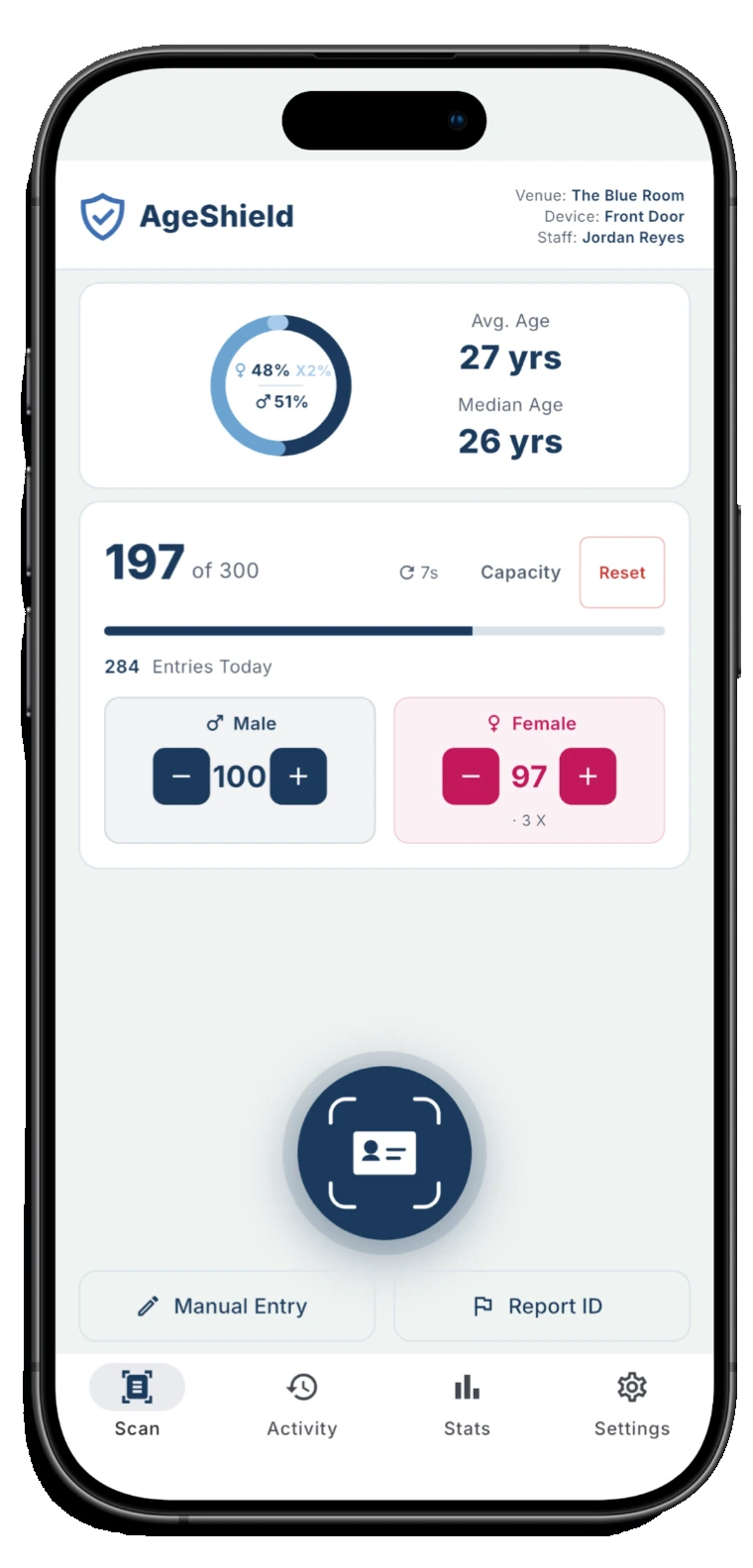
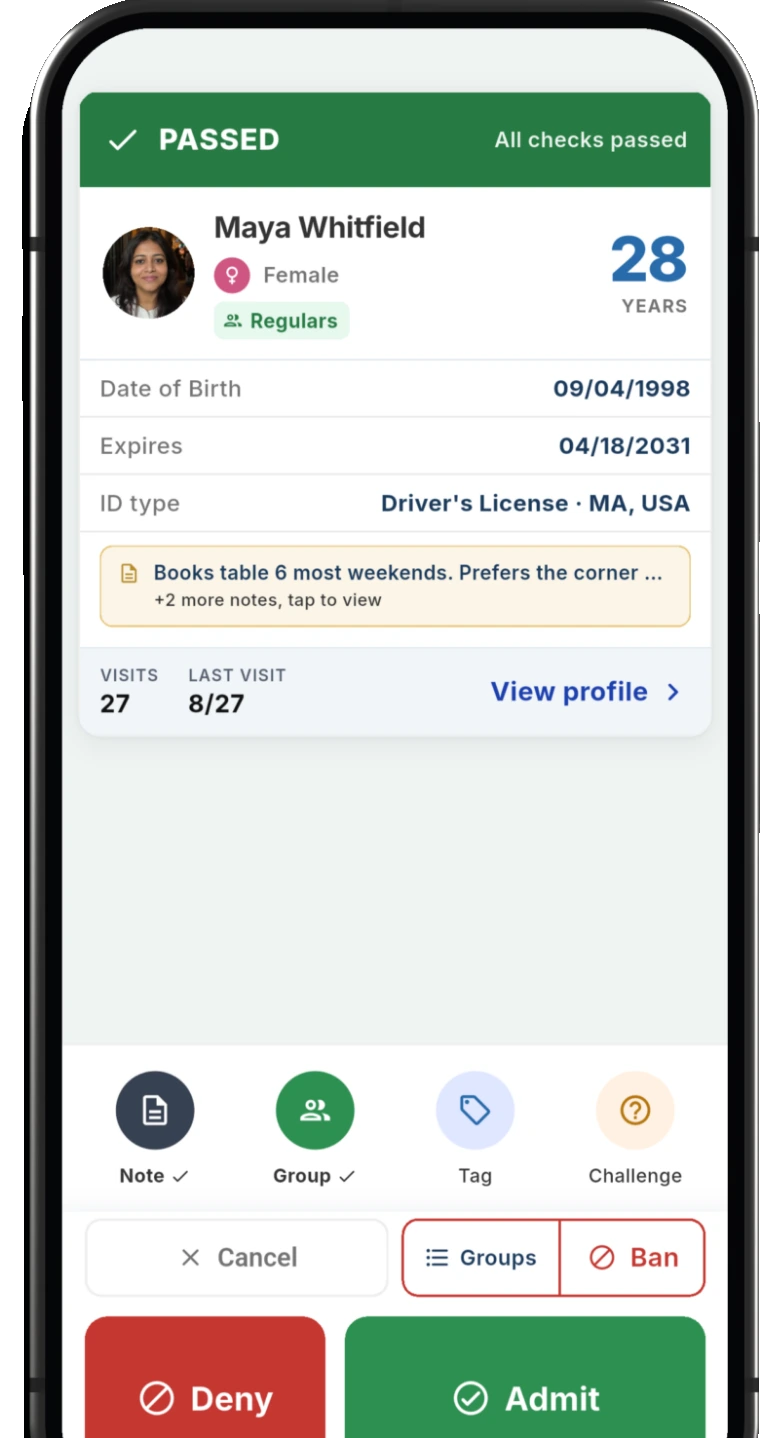
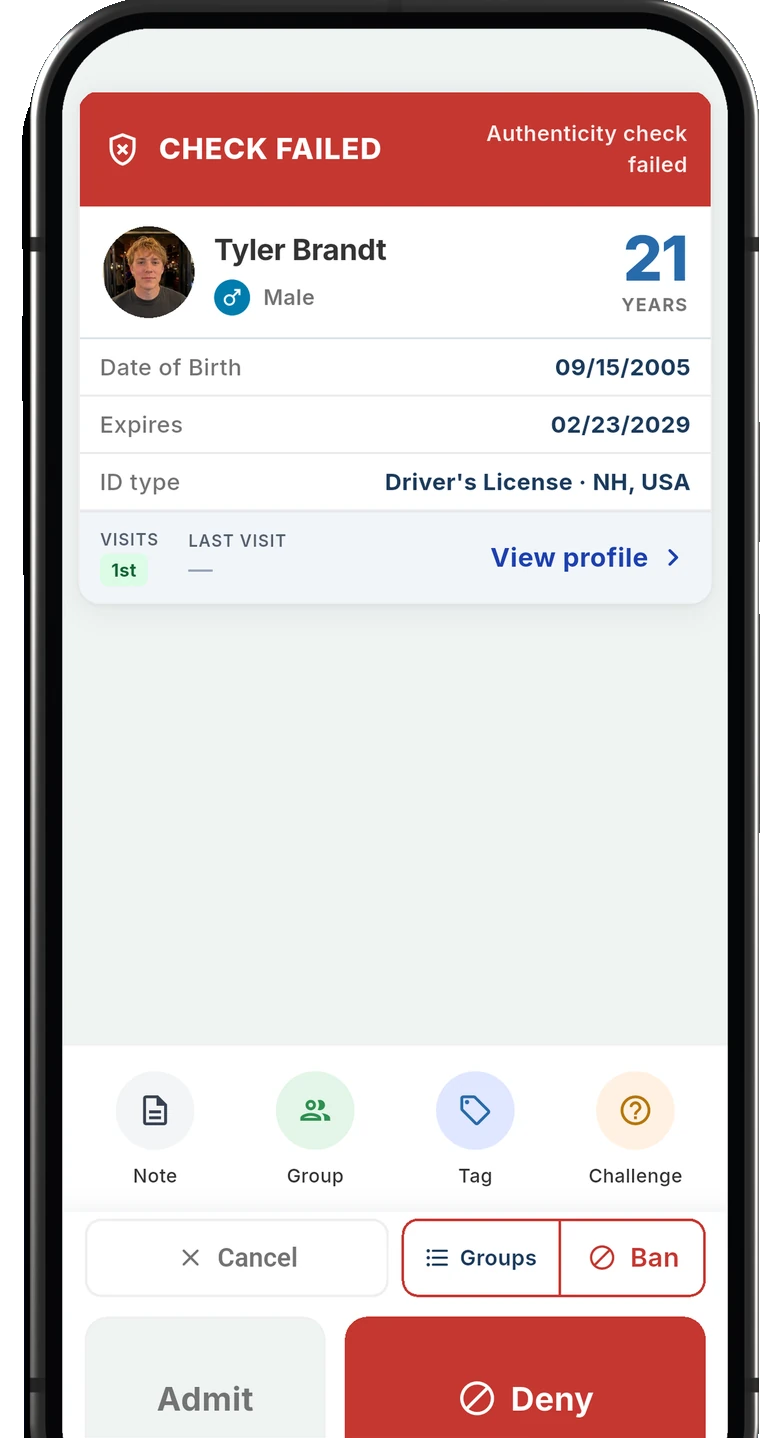
AgeShield ID Scanner
You decide what the scan keeps
Choose, field by field, what staff see at the door and what is stored, and how long guest details stay. At the strictest settings nothing from the ID is kept in readable form.
What the barcode on a US license holds
The barcode on the back of a US driver's license or state ID is a PDF417 code, laid out under a standard set by AAMVA, the association of US and Canadian motor vehicle agencies. Almost everything it carries is also printed on the card.
Every barcode under the standard carries:
- The full name: first, middle and last
- The date of birth
- Sex, height and eye color
- The street address, city, state and ZIP code
- The license or ID number, plus a number for that particular card
- The issue date, the expiration date and the issuing country
- On a driver's license, the vehicle class, restrictions and endorsements
A state may add optional details, such as hair color, weight, place of birth and the dates the holder turns 18, 19 and 21. The standard requires this data to be unencrypted, so any PDF417 reader can decode it.
The standard also asks states to put nothing in the barcode that is not printed on the card, and to tell the cardholder when they do. Texas law goes further: its licenses may hold nothing in electronically readable form beyond what is printed on them and a physical description.
AAMVA DL/ID Card Design Standard (2025), Annex DTex. Transp. Code 521.126
What staff see, and what a scanner can keep
Reading the barcode and keeping what it holds are separate steps. A scanner decodes it to work out the age and check the expiration date. What it then shows on screen or stores depends on the scanner and how the venue set it up.
Some states limit what a scan may reach. Rhode Island lets a business access only six details from a license, and only to determine age: the name, age, date of birth, signature, photo and expiration date. In Utah, the state's verification program for bars, taverns and restaurants specifies scanning technology that displays no more than the name, age, ID number, date of birth, gender and the status and expiration date of the ID.
What state laws say about keeping scan data
State rules on keeping scan data range from a ban to a short list of details or a fixed period. Six examples:
- State
- Texas
- What the law says
- Information read from an ID under its alcohol law's scanning section may not be retained.
- State
- Rhode Island
- What the law says
- A business may not store, record or retain any information it reads from a license with a digital reading device.
- State
- Hawaii
- What the law says
- A business may scan an ID to check age when there is reasonable doubt about it, and may not keep information from that scan.
- State
- New York
- What the law says
- A licensee scanning for a sale or at the door of a 21-and-over venue may record only the name, date of birth, license or ID number and expiration date, and may not resell the information or pass it to a third party.
- State
- Nebraska
- What the law says
- A retailer selling alcohol, lottery tickets or tobacco may store only the age and the ID number, posts a sign saying so and keeps them no longer than 18 months unless other law requires it. Knowingly storing more is a felony.
- State
- Utah
- What the law says
- Under the state's verification program, bars, taverns and restaurants use scan information only to verify age and keep it for seven days after the day it was obtained.
Tex. Alco. Bev. Code 109.61R.I. Gen. Laws 31-10-26HRS 487J-6N.Y. Alco. Bev. Cont. Law 65-bNeb. Rev. Stat. 60-4,111.01Utah Code 32B-1-407
For any other state, each guide in ID scanning laws by state answers the same question, "Can you keep data from an ID scan?", from that state's law.
What AgeShield shows and keeps by default
At the door, the AgeShield result screen leads with one result in capital letters, such as PASSED or UNDERAGE. The guest's name, age and expiration date always show on the phone, because staff need them to make the call.
Every scan creates a visit record: who scanned, when, the document type, the result, the scan mode and what staff decided. By default the record also keeps the guest's name, date of birth, gender, issuing state, ID type and expiration date. The full ID number is never stored, only the last four digits and a one-way code that lets the app recognize a returning or banned guest.
Guest details are kept for 30 days by default. After that the personal details are removed and the visit stays with its decision and an age range. Banned guests are kept while the ban lasts. Guest photos are a Pro feature, off until the venue turns them on.
- Field
- Full name
- By default
- Shown and stored
- Field
- Date of birth and age
- By default
- Date of birth stored
- Field
- ID number
- By default
- Last 4 kept
- Field
- ID expiration
- By default
- Shown and stored
- Field
- Gender
- By default
- Shown and stored
- Field
- Issuing state and country
- By default
- Shown and stored
- Field
- ID type
- By default
- Shown and stored
- Field
- ZIP code
- By default
- Shown at the door
Defaults apply to a new venue. Changing a field affects new scans, not scans already held.
What a venue can change
Owners and managers set each field per venue in the hub: excluded, shown at the door only or shown and stored. The name and the expiration date cannot be excluded, because staff need them at the door, and a venue can store only whether the guest is old enough instead of the birth date. Excluded fields are dropped on the phone as the ID is read, so they are never shown, sent or stored.
Retention is a number of days, up to two years on Core or five years on Pro, and it can be set to 0. Lowering it also shortens records the venue already holds. With every unneeded field excluded, only whether the guest is old enough stored, guest records off and retention at 0, a scan leaves a record that it happened and what the check and staff decided, with nothing from the ID in readable form.
Some things stay even then. Any note staff type is kept as written, codes derived from the first and last name are kept though the name itself is not, and the audit log records that a scan happened, with the device and staff member, for seven years. The cost is at the door: returning guests are no longer recognized and banned alerts stop firing.
With the consent screen on, each guest sees what is collected, how long it is kept and who it is shared with, under the venue's name and privacy policy link, and their I Agree or Decline is saved with the visit. And each time someone opens a guest's details, the log records who, when and from which device. Privacy controls has the full list.
Answering a guest who asks
An answer can be short and still cover why the door scans, what is kept, for how long and where the privacy policy is. Written once from the venue's settings, it stays the same from every staff member.
Whether a guest can refuse the scan is a separate question that each state guide answers. The bar door policy template has room for what the door does when someone says no.
AgeShield ID Scanner
Where AgeShield fits when a guest asks
AgeShield lets the venue decide, field by field, what staff see at the door and what is stored, and set how long guest details are kept: 30 days by default, or as little as 0. With the consent screen on, each guest sees what is kept and for how long before the scan, and their answer is saved with the visit.
Common questions
Does scanning your ID at a bar save your information?
It depends on the scanner, how the venue set it up and the state. Texas, Rhode Island and Hawaii do not allow information from an age-check scan to be kept, while other states limit what may be kept or for how long. In AgeShield, the venue chooses what each field does and how long guest details stay.
Is the barcode on a driver's license encrypted?
No. The AAMVA standard for US and Canadian license barcodes requires its data to be unencrypted, so any PDF417 barcode reader can decode the name, date of birth, address and the rest. A state may encrypt extra data of its own in a separate part of the barcode.
Can a bar see your address when it scans your ID?
The address is in the barcode, so a scanner can read it. Whether it shows on screen depends on the scanner and its settings, and some states limit it: Rhode Island's law lists the six details a business may access from a license, and the address is not one of them.
How long can a bar keep data from an ID scan?
That depends on the state. Nebraska caps what a retailer stores at 18 months unless other law requires longer, Utah ties the record to seven days, and Texas, Rhode Island and Hawaii do not allow age-check scan data to be kept. In AgeShield, guest details stay 30 days by default and the venue sets the number of days, down to 0.
Sources
- AAMVA DL/ID Card Design Standard (2025), Annex D
- Tex. Transp. Code 521.126
- R.I. Gen. Laws 31-10-26
- Utah Code 32B-1-407
- Tex. Alco. Bev. Code 109.61
- HRS 487J-6
- N.Y. Alco. Bev. Cont. Law 65-b
- Neb. Rev. Stat. 60-4,111.01
This page is for informational purposes only and is not a substitute for professional legal advice. We research each rule and link its source, so you can check it against your own venue. Questions are welcome at support@ageshield.bar.
Still unsure what your state lets a venue keep?
Tell us what type of venue you run and we'll point you to the published rules we know of that may apply.