
The ID scanner app for iPhone and Android
Everything a door needs, on the phones and tablets your staff already carry.
- A fake ID check on licenses and state IDs
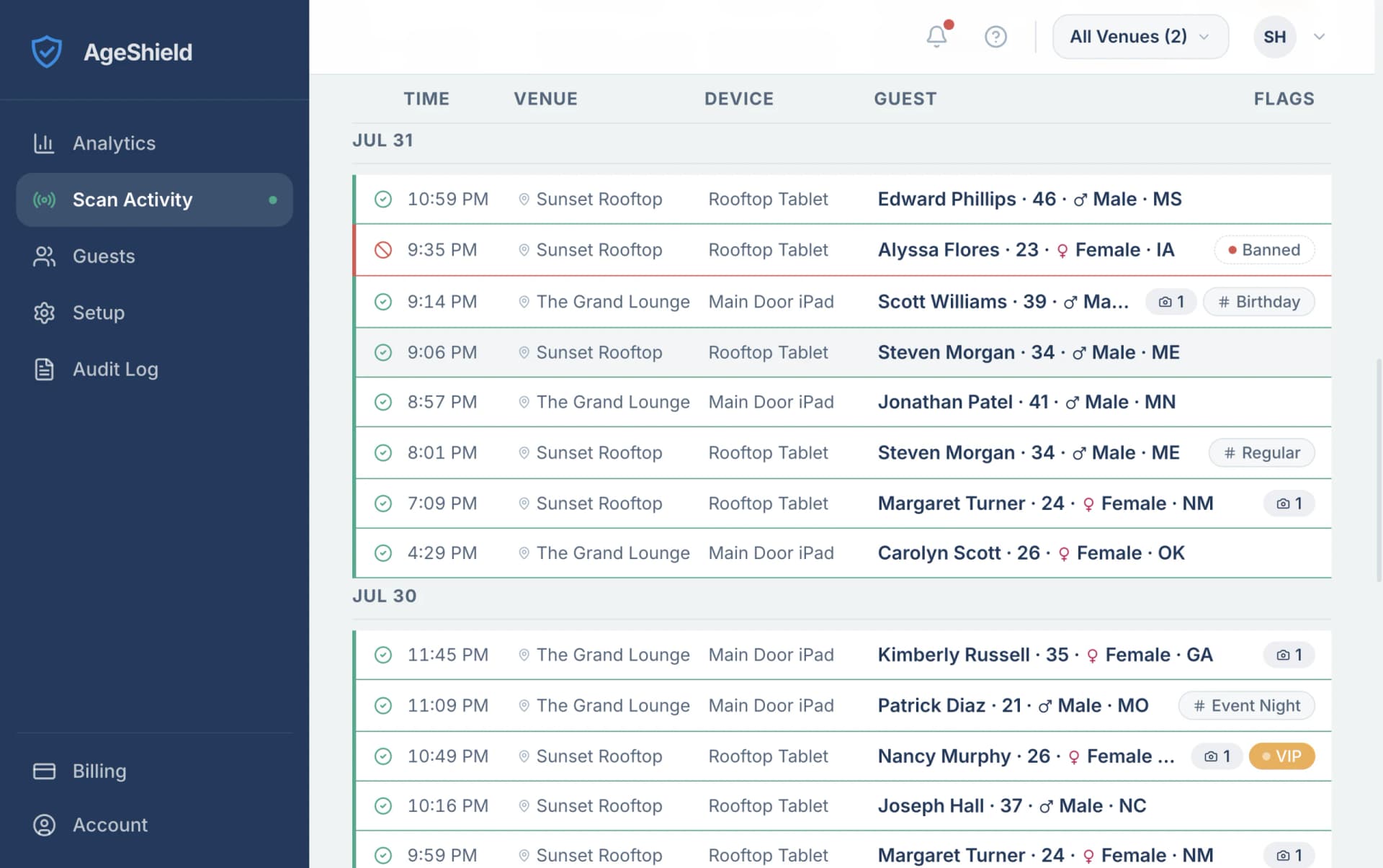
- Banned, VIP and Regulars lists on every phone
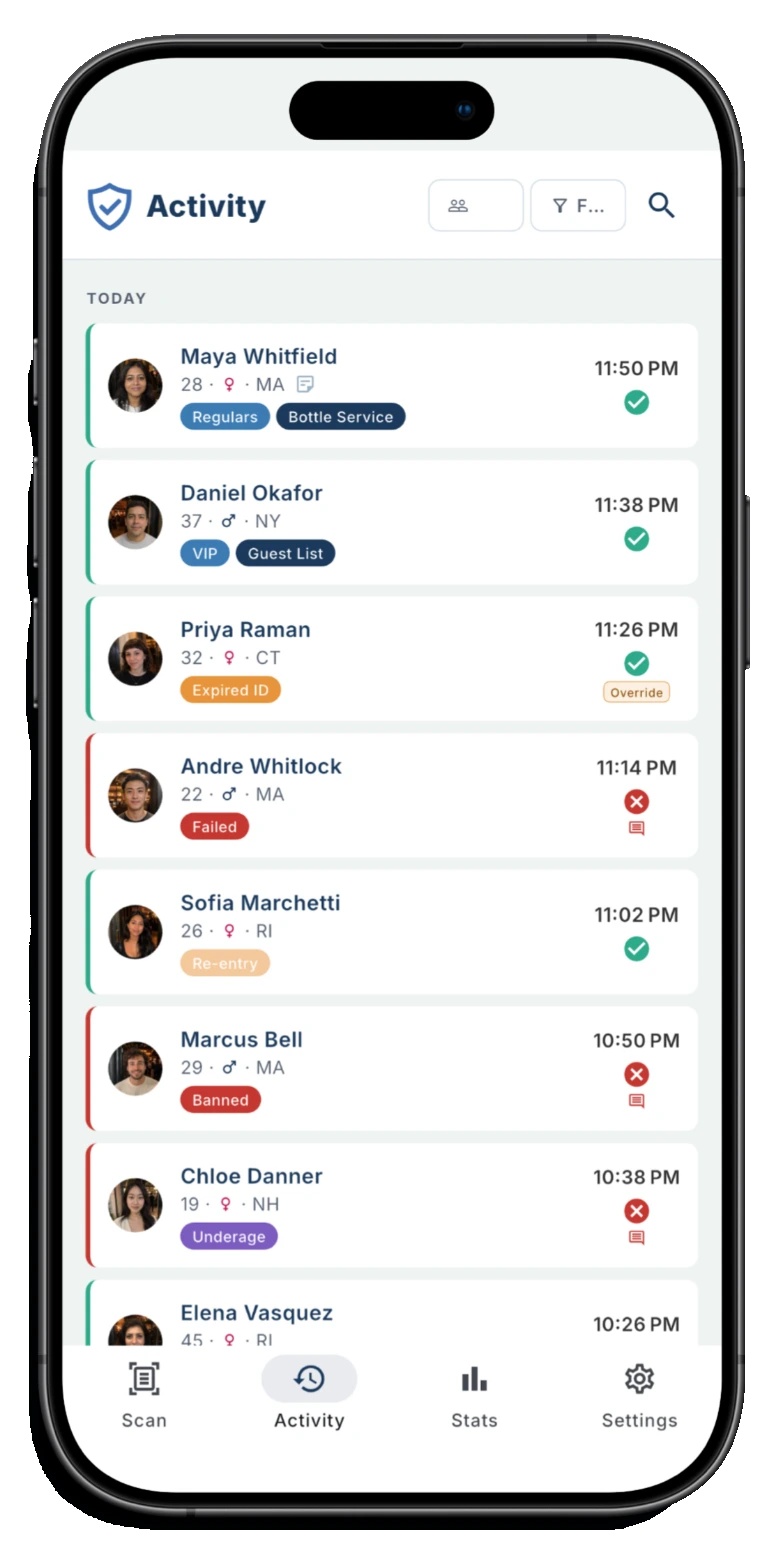
- An audit log of every scan and decision
- Analytics: busiest hours, ages, top states
- Retention you set; custom groups and visit tags on Pro
Using it at a bar or club door? See the ID scanner for bars


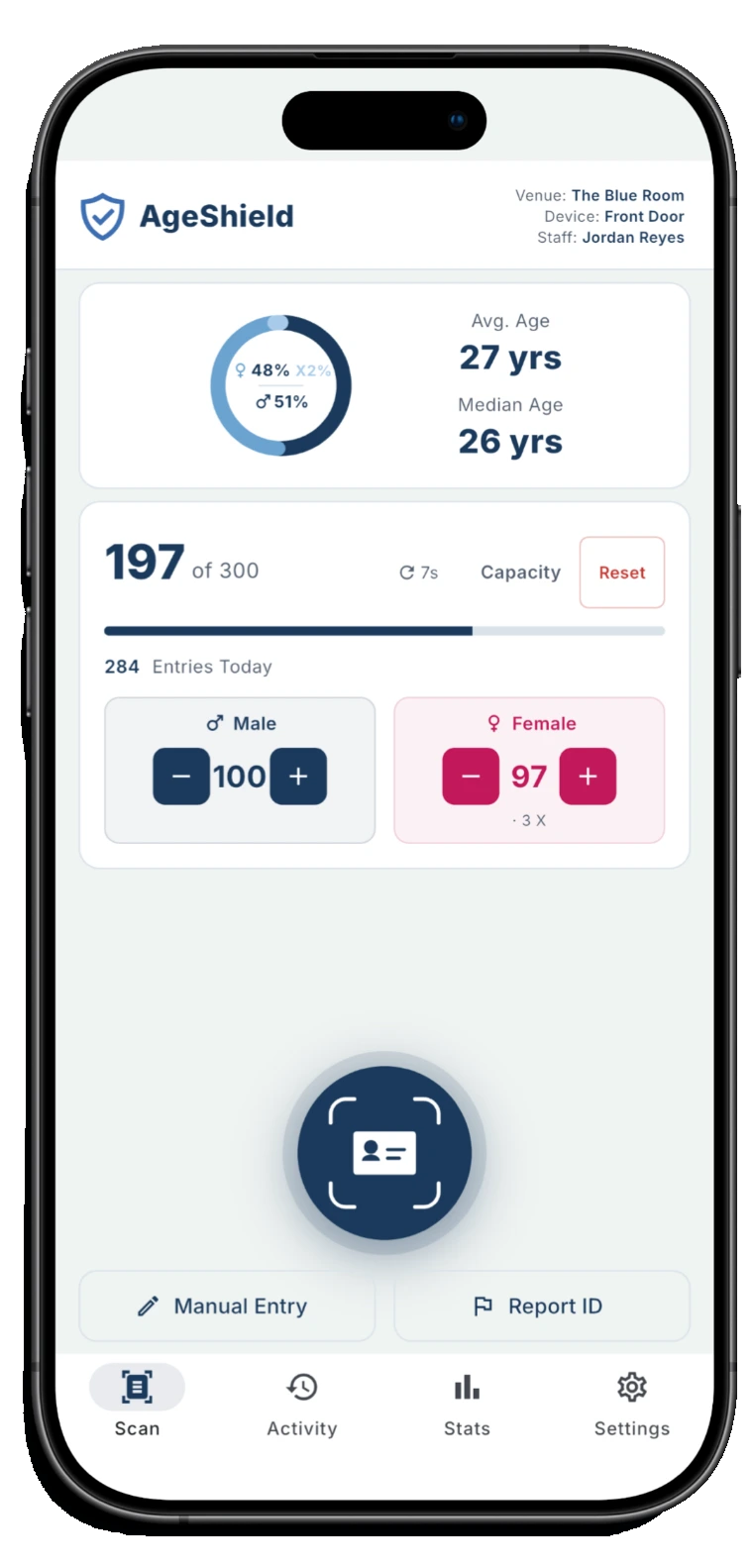
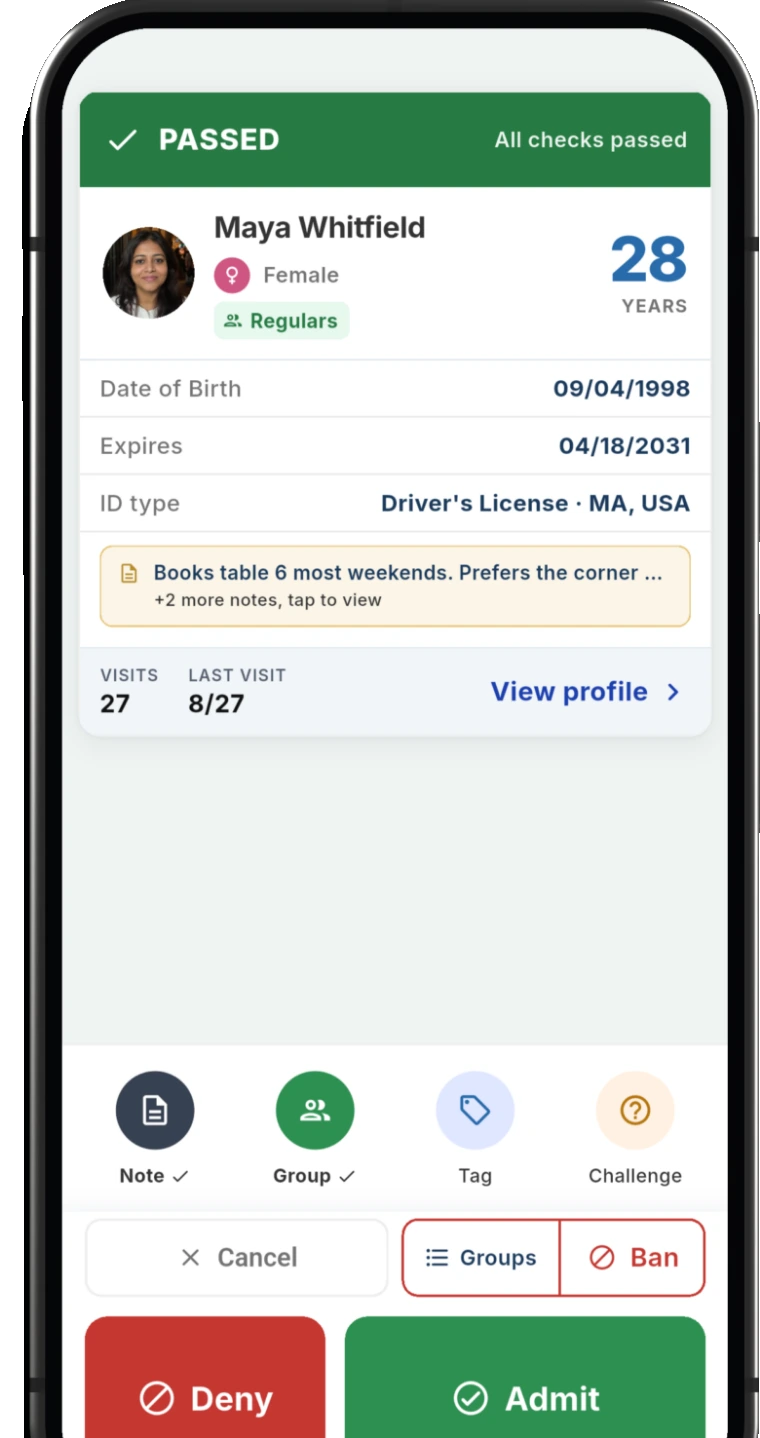
The app at a glance
- Runs on
- iPhone and iPad with iOS 15.5 or later, and Android phones and tablets with Android 8.0 or later
- Reads
- Driver's licenses from the US and Canada and some from other countries, plus US state IDs, US green cards and passports
- Checks
- Age against your venue's minimum, expiry, your Banned and VIP lists, and the barcode on US and Canadian licenses and state IDs for signs of forgery
- Scan modes
- Fast, Standard and Secure. A new device starts in Standard
- Without a signal
- Keeps scanning, including from a cold start, and syncs visits when the phone reconnects
- Devices
- Three scanning at once on every plan. More from $13.86/month each, billed annually
- Price
- Free to download. Plans from $41.58/month billed annually, or $49/month
- Trial
- 14 days free on your first venue, with every Pro feature on
What the app does
The app and the AgeShield hub work as one: the phone scans and your staff decide at the door, and the hub keeps the records and the settings. Features marked Pro are on the Pro plan, and all of them are on during the trial.
Every scan
What the app checks and shows before your staff decide.
Fake ID check
Checks the barcode on US and Canadian licenses and IDs for signs of forgery, in every scan mode. Included on all plans.
Age and expiry
Checks the date of birth against your venue's minimum age, which starts at 21, and flags an expired ID.
Alerts
Alerts on the scan result for failed checks, underage, expired, banned and re-entry, plus an at-capacity warning.
Re-entry warning
Warns when the same ID comes back within a window you set, from 1 minute to 24 hours.
Capacity
Live headcount that counts every admit, with an at-capacity warning. Included on all plans.
Manual Entry
Staff can type the details in when a card won't scan. Age and expiry checks still run.
Admit or deny in one tap
One tap to admit or deny, and each decision is recorded.
Your guests
Who is at the door, and what your team already knows about them.
Returning guests
Recognizes returning guests at the door and shows their visit count and history.
Guest lists
Banned, VIP and Regulars lists on every plan.
Guest notes
Up to 10 notes per guest, shown to staff on the scan result.
Custom listsPro
Custom lists, including lists that block entry when scanned.
Visit tagsPro
Tags on visits, for example an incident or a promotion.
Guest photosPro
Staff take a photo of the guest as part of the scan.
Your team and your records
Who scanned, what the numbers say and what you keep.
Staff sign-in
Turn on staff sign-in and each scan records who made it, by personal PIN. Included on all plans.
Analytics at the door
Scans, decisions, busiest hours, age, gender, top states and ZIP codes, on the phone at the door as well as in the hub.
Access log
Records who opened a guest's details or photos and when. Export the log as CSV, Excel or PDF.
Field-by-field privacy
Pick which ID fields are stored and how age is recorded. State-aware defaults you can change.
Retention you set
You set how many days guest details are kept, up to 2 years on Core or 5 years on Pro.
Consent screen
Guests see what is collected and tap I Agree before the scan. Pre-set on in five states, and you can change it.
Three scan modes
Each device runs in one of three modes, and a venue can set the lowest mode its devices may use. A new device starts in Standard.
Fast
Fastest. Accepts either side of the ID on its own, front or back.
Standard
Requires the back barcode. A front-only scan is not accepted.
Secure
Most secure. Requires front and back, cross-checked for tampering.
What each mode reads and checks is on how AgeShield checks an ID.
Keeps scanning without a signal
The phone works out the result from the lists it already has, including after a cold start, and syncs visits once it reconnects. If its ban list has not synced for 30 minutes, the app tells staff to verify the guest manually. The fake ID check runs on the phone itself, so it keeps working too.
From download to first scan
1. Set up your venue
Create your venue in the AgeShield hub and start the 14-day trial.
2. Install the app
Install AgeShield ID Scanner from the App Store or Google Play on each phone or tablet that will scan.
3. Sign each device in
Sign in each phone by scanning a QR code from the hub.
4. Scan
Point the camera at the ID. The result shows on screen and your staff makes the call.
For the setup a bar runs at the door, see the ID scanner for bars. If you are choosing between a phone app and dedicated hardware, see an ID scanner app or a handheld scanner.
Questions about the app
Is there an ID scanner app for iPhone?
Yes. AgeShield ID Scanner runs on iPhone and iPad with iOS 15.5 or later and is on the App Store.
Does the ID scanner app work on Android?
Yes, on Android phones and tablets with Android 8.0 or later, from Google Play.
Can an ID scanner app catch a fake ID?
AgeShield checks the barcode on US and Canadian licenses and state IDs for signs of forgery on every scan. A flag describes what the scan observed and is not proof that an ID is fake, and a clean result is not proof that one is real.
Does it work without a signal?
Yes. The phone decides the result from the lists it already has and syncs once it reconnects, including after a cold start.
How many phones can I use?
Three devices scan at once on every plan. You can add more from $13.86/month each, billed annually.
Is the app free?
The app is free to download. Scanning needs a plan for your venue, from $41.58/month billed annually, and your first venue starts with 14 days free.
See it in more detail
How a scan works, what a bar sets up at the door and what the plans cost.
- Product
 Product
How AgeShield works
See what happens in the two seconds after a scan: age checks, fake ID signals and what your venue keeps.
- Product
 Product
ID scanning for bars
See what a bar actually needs at the door: fast ID checks, repeat guests and a usable audit trail.
 ProductProduct
Pricing
See what you get for the price: included devices, Pro features and the 14-day free trial.
Try the app at your door
Fourteen days free on your first venue, with every Pro feature on and three devices scanning at once.
Start your 14-day free trial